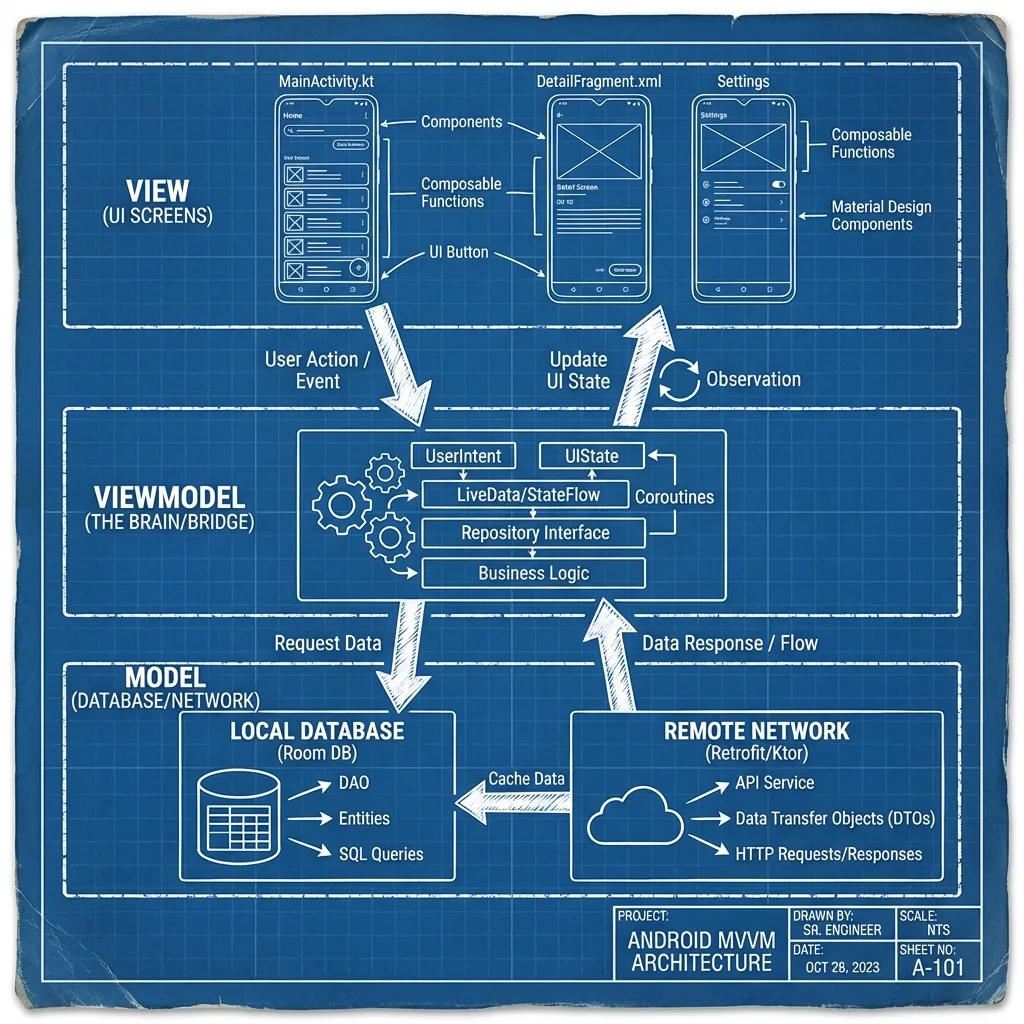
Modern Architecture (MVVM): Building Robust and Testable Android Apps
Understand the MVVM pattern and how ViewModel, LiveData/StateFlow, and Repository pattern solve the fundamental problems of Android's lifecycle.
✨TL;DR / Executive Summary
Understand the MVVM pattern and how ViewModel, LiveData/StateFlow, and Repository pattern solve the fundamental problems of Android's lifecycle.
💡 TL;DR (Too Long; Didn't Read)
- MVVM: Architecture pattern that separates UI (View) from logic (ViewModel) and data (Model/Repository) to solve fragility from component destruction
- ViewModel: Stores and exposes UI state, survives configuration changes (screen rotation) because its lifecycle is decoupled from Activity/Fragment
- LiveData/StateFlow: Observables that notify the View when data changes, being lifecycle-aware (LiveData) or requiring composition (StateFlow) to avoid leaks
- Repository Pattern: Data access abstraction that implements Single Source of Truth, allowing ViewModel testing in isolation without real network calls
- Main Takeaway: MVVM with ViewModel + LiveData/StateFlow + Repository is the modern standard Android architecture that makes apps robust, testable, and maintainable
Estimated Reading Time: 30 minutes
You already master Kotlin syntax and understand Android's engine. Now, let's put these pieces together to build something that lasts. An application's architecture is what separates a fragile prototype from a professional, maintainable, and scalable software product.
In Android, modern architecture, strongly recommended by Google, centers on the MVVM (Model-View-ViewModel) pattern and a set of Jetpack components designed to solve the platform's most common problems.
This article isn't about abstract design pattern theory. It's about the practical application of MVVM to solve problem number one: the destructive lifecycle of UI components. We'll build an architecture that not only survives screen rotations, but does so elegantly, testably, and with clean code.
The Central Problem: The Illusion of UI Persistence
As we've seen, an Activity or Fragment can be destroyed and recreated at any time by the system. If you store your application state (form data, network request results) directly in the Activity, that state is lost.
Old solutions, like onSaveInstanceState, are manual, limited (only for small amounts of data), and don't help with long-running operations, like a network call that was in progress when the screen rotated.
MVVM architecture, with its key components, was created to isolate and protect application state from UI layer volatility.
The Central Pillar: The ViewModel
The ViewModel is the star of the show. Think of it as the brain and guardian of your screen's state.
Fundamental Responsibility
- Store and expose data for the UI (View).
- Survive configuration changes (like screen rotation).
How does it work?
The ViewModel has a scope that's tied to the UI component's lifecycle (Activity/Fragment), but not to its instance. When an Activity is destroyed and recreated due to rotation, the ViewModel associated with it is not destroyed. The new Activity instance connects to the same ViewModel that already existed.
Analogy: Imagine your Activity as an "actor" who can be replaced mid-play. The ViewModel is the "script" that stays on stage. The new actor picks up the same script and continues the play where it left off.
Practical Example
class MyViewModel : ViewModel() {
    // This data survives screen rotation!
    private val _userName = MutableLiveData<String>()
    val userName: LiveData<String> = _userName

    fun onButtonClicked() {
        _userName.value = "Data loaded!"
    }
}
In your Activity, you get a ViewModel instance:
class MyActivity : AppCompatActivity() {
    private val viewModel: MyViewModel by viewModels() // KTX delegate property

    override fun onCreate(savedInstanceState: Bundle?) {
        super.onCreate(savedInstanceState)
        // ... UI setup ...

        // If the Activity is recreated, 'viewModel' will point to the same instance
        viewModel.onButtonClicked()
    }
}
The by viewModels() is a delegate that handles the magic of getting (or creating) the ViewModel associated with this Activity's lifecycle.
The Reactive Connection: LiveData and StateFlow
Ok, the ViewModel holds the data. But how does the View (Activity/Fragment) know when this data changes, especially after recreation? The answer is reactive programming, through LiveData or StateFlow.
LiveData: Simplicity and Lifecycle Safety
LiveData is an observable data holder class. It's "lifecycle-aware", meaning it understands Android component lifecycles (Activity, Fragment).
How it works
- The View "subscribes" (observes) a
LiveDataobject in theViewModel. - The View only receives updates while it's in an active lifecycle state (
STARTEDorRESUMED). - If the View is destroyed (or becomes inactive), it automatically stops receiving updates, avoiding memory leaks and crashes.
- When the View is recreated (after rotation), it observes again and immediately receives the last available value in the
LiveData.
Example
// In the ViewModel
private val _uiState = MutableLiveData<UiState>()
val uiState: LiveData<UiState> = _uiState

fun loadData() {
    _uiState.value = UiState.Loading
    // ... logic to load data ...
    _uiState.value = UiState.Success(data)
}

// In the Activity
viewModel.uiState.observe(this) { state ->
    when (state) {
        is UiState.Loading -> showProgressBar()
        is UiState.Success -> hideProgressBar() && showData(state.data)
        is UiState.Error -> showError(state.message)
    }
}StateFlow: The Power of Coroutines
StateFlow is the more modern and flexible alternative, part of Kotlin's Coroutines ecosystem. It's also an observable data holder, but with some key differences:
- Always has an initial value: A
StateFlowcan never be "empty". - More powerful: It integrates perfectly with other Kotlin flow operators.
- Not "lifecycle-aware" by default: You need to combine it with an operator like
lifecycleScope.launchWhenStartedor, better yet, withflowWithLifecycleto get the same safe behavior asLiveData.
Example with StateFlow
// In the ViewModel
private val _uiState = MutableStateFlow<UiState>(UiState.Idle)
val uiState: StateFlow<UiState> = _uiState.asStateFlow()

fun loadData() {
    viewModelScope.launch {
        _uiState.value = UiState.Loading
        // ...
        _uiState.value = UiState.Success(data)
    }
}

// In the Activity (with the 'flowWithLifecycle' extension)
lifecycleScope.launch {
    viewModel.uiState
        .flowWithLifecycle(lifecycle, Lifecycle.State.STARTED)
        .collect { state ->
            // UI logic here
        }
}
Which to use?
LiveData: Simpler, perfect for direct UI use cases. Less verbose.StateFlow: More flexible, ideal for more complex logic, data streams not coming directly from UI, or if you're already immersed in the Coroutines/Flows ecosystem.
Data Abstraction: The Repository Pattern
The ViewModel shouldn't know where data comes from. It shouldn't care if data comes from an internet API, a local database, or an in-memory cache. That's the Repository's responsibility.
The Repository is a class that implements data access logic. It acts as an abstraction layer between your application and data sources.
Benefits
- Separation of Concerns: ViewModel handles UI logic; Repository handles data logic.
- Testability: You can "mock" the Repository to test the ViewModel in isolation, without making real network calls.
- Single Source of Truth: The Repository can implement sophisticated logic, like:
- Fetch data from the network.
- Save it to a local database (using Room).
- Expose database data as the single source for the UI.
- Next time data is requested, fetch it from local cache (fast) and update in background (stale-while-revalidate).
Layer Structure
View (Activity/Fragment)
    ↓ calls methods on
ViewModel
    ↓ calls methods on
Repository
    ↓ decides between
Retrofit (Network)  ←→  Room (Database)
Practical Repository Example
class UserRepository(
    private val userApi: UserApi,
    private val userDao: UserDao
) {
    // Exposes a Flow that combines network and database data
    fun getUsers(): Flow<Result<List<User>>> = flow {
        emit(Result.Loading)

        try {
            // Try to fetch from network
            val networkUsers = userApi.fetchUsers()

            // Save to database
            userDao.insertAll(networkUsers)

            // Emit database result as single source
            emit(Result.Success(userDao.getAllUsers()))
        } catch (e: Exception) {
            // If network error, try to fetch from database
            val cachedUsers = userDao.getAllUsers()
            if (cachedUsers.isNotEmpty()) {
                emit(Result.Success(cachedUsers))
            } else {
                emit(Result.Error(e))
            }
        }
    }
}
Putting It All Together: The Complete Flow
Let's visualize a complete flow for a screen that displays a user list.
-
The View (
UserListFragment) is created. -
In
onViewCreated, it gets aUserListViewModelinstance. -
The View starts "observing" the ViewModel's
StateFlow<UiState>. -
The View calls
viewModel.loadUsers(). -
The
UserListViewModelcallsrepository.getUsers(). -
The
UserRepositorystarts a coroutine.- It first emits a
Loadingstate to the ViewModel. - It makes a network call using Retrofit.
- If the call succeeds, it saves the user list to the local database using Room.
- It then fetches the updated list from Room (which is now the "source of truth") and returns it to the ViewModel.
- If there's an error, it emits an
Errorstate.
- It first emits a
-
The
UserListViewModelreceives the result (either the user list or an error) and updates itsStateFlowwith the new state (Success(data)orError(exception)). -
The View, which is observing the
StateFlow, automatically receives the new state. -
The View renders the corresponding UI: shows a
ProgressBarforLoading, the list in aRecyclerViewforSuccess, or an error message forError.
The Rotation Miracle
If the user rotates the screen, the View is destroyed and recreated. It reconnects to the same ViewModel, which still has the last state (Success(data)). The View observes the StateFlow and immediately receives the data, updating the UI instantly, without any network call. The experience is perfect.
Conclusion: Architecture as Foundation
Adopting MVVM with ViewModel, LiveData/StateFlow, and Repository isn't following a fad. It's building a solid foundation for your Android application. The benefits are tangible and immediate:
- Robustness: Your app becomes immune to Android's most common and frustrating problem: Activity destruction.
- Testability: You can test business logic (ViewModel) and data logic (Repository) separately from the UI, with fast and reliable unit tests.
- Maintainability: Separation of concerns is clear. Changing the data source (switching APIs) doesn't require changing the ViewModel. Changing a UI button doesn't require changing the Repository.
- Scalability: This architecture scales from single-screen apps to complex systems with multiple modules.
With this block mastered, you're no longer just "programming for Android". You're architecting robust solutions for the platform. You now have the foundation to build professional, maintainable applications that work perfectly in all real-world situations.